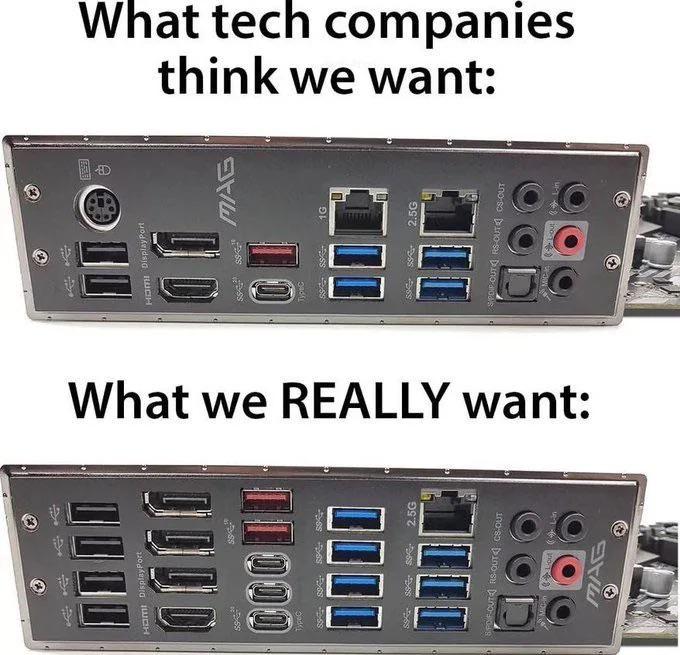
I don’t want a single displayport on my motherboard. But I do want a couple more USB-C, though i’d rather have them on the case so that makes it a case maker issue
No we don’t, no one is wasting PCIe lanes for a bunch of external ports, and Motherboard manufacturers already pack it plenty full as much as they can without it.
We want cheap hardware and more than 16 lanes on affordable CPUs again.
Feels like the damn 90s with these AI inflated component prices.
I have an obscure one that’d be nice RCA jacks for audio, fuck 3.5mm
I’d want the ps/2 port but one of the cats chewed through the mouse wire. Ugh…
See? Rookie mistake. Should have used a dog cable.
Uh, no? I would like to keep the PS2 port, thanks. And the extra ethernet port. And they should add VGA, DVI, and RS232 serial ports.
I’d prefer more USBC. Less display port (I use USBC for that)
Displayport can daisy-chain.
TIL
Doesn’t that limit things like resolution/refresh?
The igpu isn’t going to keep up with that much credibly anyway.
The “what we want” version would require some pretty severe fuckery on the main board, like a secondary chipset or a CPU with even more PCIe lanes, but I don’t disagree with the “want” part!
On that note, you might as well just use hubs, which you can then potentially place more conveniently anyways.
You can’t kill the ps/2 port and not be called a genocider.
gotta live with the times man, we’re up to ps5 pro now
If my Linux machine freezes I still want to be able to use the keyboard damnit
Even some windows gamers still use it, it’s more resource efficient than other inputs.
4 display outputs for onboard graphics? Why lol. I’ll take the dual ethernet ports.
Make that four. And ten gig, please.
QSFP28 PLS
Quad monitor+tv or 3 monitors and a vr set.
Whats the point if 2 ethernet ports?
Ain’t no integrated graphics pushing all that shit. But at this point, it’s the only thing available. 😂
Onboard graphics these days can certainly push 3-4 monitors, but you ain’t gonna be playing any games on it. At least nothing demanding. Could probably play stuff from the early 2000’s and before. Which, I mean, who needs anything else? Halo CE, my beloved…
4 on-board DisplayPorts on my work desktop work just fine. Now, I’m not doing gaming. But I have dual 50" curved ultra-widescreens, a 55" wall monitor, and a 15" compact displaying email.
I’m glad work paid for it.
That would be fine for office work, not so much for games.
Separate network for NAS or local services. Or
bridgedbonded for more bandwidthBonded is more bandwidth. Bridged is just letting traffic flow between them.
Thanks, that is what I meant
Why does this have so many names?
Some stuff calls it bonded, sometimes it’s teamed, sometimes LAGed or aggregated or bundled or link channelled or ethertrunked or smartgrouped or Multi-link trunked etc. etc.
No idea! If I had to guess, the weird ones come from marketing and not engineering. “Bonded” has been a term for a looooong time, not that I actually remember/know the history of it.
I’m sure some of the things you cited try to make up for deficiencies vs basic bonding, but networking can only get so complicated until you hit higher networking layers.
Yeah. Wikipedia calls it “link aggregation” and the standard is IEEE 802.1AX which also calls it that and the protocol LACP. I think the real reason for so many names is that the standard wasn’t developed until later so everyone built their own competing incompatible implementations with different names and it was a mess for years.
Linux implemented it with the Linux bonding driver and switch manufactures made up their own proprietary extensions for it but the standard didn’t become a thing until like 2000. Seems like “teaming” is one of the most popular names for it.
Bonded ethernet ports are for redundancy and concurrency, which is not quite additional bandwidth. (Just calling that out to help squash any misconceptions of how bonding works. It is technically more bandwidth, but you won’t see total throughput of the two links unless you are transferring multiple files.)
Yea, it definitely does not help a single stream hit higher bandwidth, that’s for sure.
(ok well it definitely could, but it’d have to be something at a higher network layer that’d know how to set up and juggle multiple data sources, like BitTorrent, or some other similarly ‘smart’ client)
Of course either way, it requires the external connections to actually be separate. If they ultimately try to cram down the same ISP service, bonding becomes a waste.
I use load balanced links to my NAS since it is primarily used for photos and other small files. I do get fairly close to full utilization if Windows needs to rebuild all the thumbnails or if my servers happen to read the NAS SMB share at the same time.
Still, it is kinda pointless except in the rare cases it’s not. 99% of the time it’s only one link that gets used. My NAS and my switch support it so there isn’t really a reason not to bond them.
The bonding I guess is fair game… But a bit odd if you only have a 2.5g and 1g ports… You would probably want those symmetrical.
But separate networks? Have you considered VLANs?
Once you’ve bonded what do you use that speed for? There’s no way my hard drive can handle 3.5G write speed.
Network speeds are GBit, not GByte. A single HDD already saturates a 2.5G port
Hmm well then the question becomes how come when I’m downloading something on Steam over my 500Mbps connection it has to pause downloading periodically while it continues writing, as if the download is faster than the hard drive?
Because steam games are compressed and your CPU can’t extract them fast enough
Huh ok, I wasn’t expecting that to be the bottleneck but it makes just as much sense!
See raid0 (but be safe and do raid 1+0). Also maybe it’s a server, so read speed is more important (usually).
Also for bridging
Double the websites, duh
How are you envisioning running a VR headset off of integrated graphics?
Excuse me? You lost a network port, and a PS/2 port. And we need to fight for more DisplayPort in the world.
What’s the advantage of DP over HDMI? I see the ports more frequently these days but rarely see monitors that take direct DP input… Mostly HDMI.
I keep having to buy DP->HDMI converters
Mostly HDMI
That is because of lobbying. The reality is that HDMI has loyalties and isn’t a free standard like display port is. Display port is also superior technologically: it is compatible with usb-c (thunderbolt), supports higher framerate, and has higher quality (up to 16K).
isn’t a free standard like display port is.
Ah, that’s all you had to say - I’m sold.
I was expecting a lot of technical AV geekery that doesn’t really apply to me but that bit speaks to me. I’m a simpleton. If it displays a terminal, an IDE, and a browser then it’s probably fine for me.
Thanks!
DP is an open standard, HDMI is proprietary and licensed. That’s the biggest difference.
DP is an open standard, HDMI is proprietary and licensed.
That’s all I needed to hear. Count me in.
Thanks for the info!
I feel like computer monitors DP is pretty common, but I also specifically try to get them. DP is pretty rare on TVs. They’re functionally the same technologies, but most TVs won’t include DP.
I had to replace a few recently and only found HDMI but I was specifically looking for the cheapest monitors possible so maybe that had something to do with it. I also needed them ASAP so I was only looking in local stores.
I’ll look closer next time.
I’ve seen the opposite more often, where most monitors will have HDMI and DP, but several that only had DP (usually miniDP) and Type-C ports. I don’t think I’ve seen any since the early 2000s that only had HDMI (and usually DVI or VGA).
Why would you want more usb if they aren’t all usb3 anyway? Make them all 3s
Make them all 4’s if we’re casting wishes.
Also where’s the 10G ethernet!?
16x USB 4, 1x 10 GbE, 4x SFP-DD, 2x HDMI, 2x DP, 2x GPMI. Oh, and a couple XLRs for audio connectivity. It’s really not much we’re asking for here.
XLR’s… lol golden.
They’re settling on 10 x 1g ethernet ports instead
Don’t need USB3 for mouse, keyboard, printer, external dac, etc.
You need a much better chipset to support 3.0 speeds on all of them at the same time. If you want to share speeds a well made usb hub will do.
In reality most people go for the cheaper option and focus more on RAM pcie and CPU features.
I have an old printer that only works up to USB 1.2 for some reason.
I can flash my Poco F1 in bootloader mode only through an ancient USB hub. The fastbootd in recovery works also without, so it must be a firmware bug.
I’d settle for affordable components at this point.
Please sir, may I have some RAM?
Just get rid of the wifi on board and give me more USB with those lanes. If people want that (and I am sure, but it seems weird on a board that also has double nics and one is 10G) just let them have a shared lane resource small m.2 (b/g) so they can add a plug in card, which also doesnt rule them out from the next big thing if you really like to be on the newest gen wifi/bluetooth stuff.
I’m pretty sure I have that exact board, I use the WiFi because it’s hard to get an ethernet connection to my computer without using something like powerline ethernet which is slow
And more SATA ports on the mobo.