Onboard graphics these days can certainly push 3-4 monitors, but you ain’t gonna be playing any games on it. At least nothing demanding. Could probably play stuff from the early 2000’s and before. Which, I mean, who needs anything else? Halo CE, my beloved…
4 on-board DisplayPorts on my work desktop work just fine. Now, I’m not doing gaming. But I have dual 50" curved ultra-widescreens, a 55" wall monitor, and a 15" compact displaying email.
Some stuff calls it bonded, sometimes it’s teamed, sometimes LAGed or aggregated or bundled or link channelled or ethertrunked or smartgrouped or Multi-link trunked etc. etc.
No idea! If I had to guess, the weird ones come from marketing and not engineering. “Bonded” has been a term for a looooong time, not that I actually remember/know the history of it.
I’m sure some of the things you cited try to make up for deficiencies vs basic bonding, but networking can only get so complicated until you hit higher networking layers.
Yeah. Wikipedia calls it “link aggregation” and the standard is IEEE 802.1AX which also calls it that and the protocol LACP. I think the real reason for so many names is that the standard wasn’t developed until later so everyone built their own competing incompatible implementations with different names and it was a mess for years.
Linux implemented it with the Linux bonding driver and switch manufactures made up their own proprietary extensions for it but the standard didn’t become a thing until like 2000. Seems like “teaming” is one of the most popular names for it.
Bonded ethernet ports are for redundancy and concurrency, which is not quite additional bandwidth. (Just calling that out to help squash any misconceptions of how bonding works. It is technically more bandwidth, but you won’t see total throughput of the two links unless you are transferring multiple files.)
Yea, it definitely does not help a single stream hit higher bandwidth, that’s for sure.
(ok well it definitely could, but it’d have to be something at a higher network layer that’d know how to set up and juggle multiple data sources, like BitTorrent, or some other similarly ‘smart’ client)
Of course either way, it requires the external connections to actually be separate. If they ultimately try to cram down the same ISP service, bonding becomes a waste.
I use load balanced links to my NAS since it is primarily used for photos and other small files. I do get fairly close to full utilization if Windows needs to rebuild all the thumbnails or if my servers happen to read the NAS SMB share at the same time.
Still, it is kinda pointless except in the rare cases it’s not. 99% of the time it’s only one link that gets used. My NAS and my switch support it so there isn’t really a reason not to bond them.
Hmm well then the question becomes how come when I’m downloading something on Steam over my 500Mbps connection it has to pause downloading periodically while it continues writing, as if the download is faster than the hard drive?

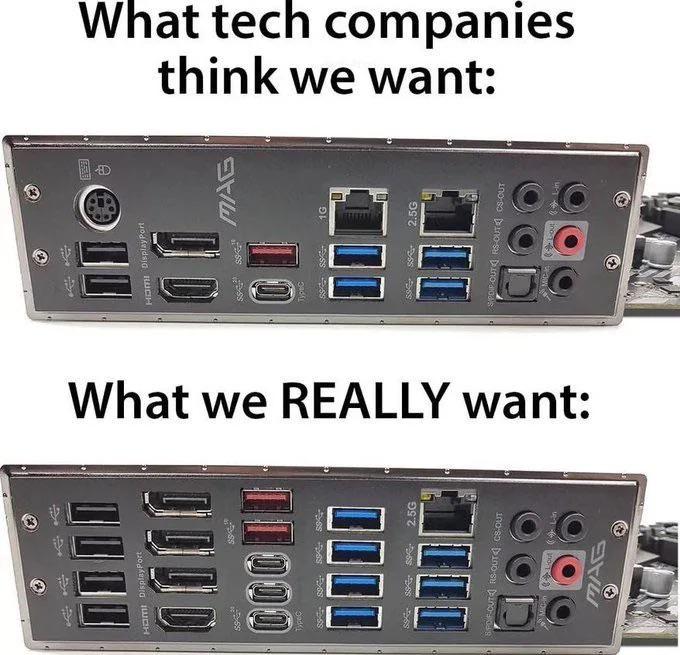
4 display outputs for onboard graphics? Why lol. I’ll take the dual ethernet ports.
Make that four. And ten gig, please.
QSFP28 PLS
Just put the fiber transceiver on the board.
Quad monitor+tv or 3 monitors and a vr set.
Whats the point if 2 ethernet ports?
Ain’t no integrated graphics pushing all that shit. But at this point, it’s the only thing available. 😂
Onboard graphics these days can certainly push 3-4 monitors, but you ain’t gonna be playing any games on it. At least nothing demanding. Could probably play stuff from the early 2000’s and before. Which, I mean, who needs anything else? Halo CE, my beloved…
That would be fine for office work, not so much for games.
4 on-board DisplayPorts on my work desktop work just fine. Now, I’m not doing gaming. But I have dual 50" curved ultra-widescreens, a 55" wall monitor, and a 15" compact displaying email.
I’m glad work paid for it.
Separate network for NAS or local services. Or
bridgedbonded for more bandwidthBonded is more bandwidth. Bridged is just letting traffic flow between them.
Thanks, that is what I meant
Why does this have so many names?
Some stuff calls it bonded, sometimes it’s teamed, sometimes LAGed or aggregated or bundled or link channelled or ethertrunked or smartgrouped or Multi-link trunked etc. etc.
No idea! If I had to guess, the weird ones come from marketing and not engineering. “Bonded” has been a term for a looooong time, not that I actually remember/know the history of it.
I’m sure some of the things you cited try to make up for deficiencies vs basic bonding, but networking can only get so complicated until you hit higher networking layers.
Yeah. Wikipedia calls it “link aggregation” and the standard is IEEE 802.1AX which also calls it that and the protocol LACP. I think the real reason for so many names is that the standard wasn’t developed until later so everyone built their own competing incompatible implementations with different names and it was a mess for years.
Linux implemented it with the Linux bonding driver and switch manufactures made up their own proprietary extensions for it but the standard didn’t become a thing until like 2000. Seems like “teaming” is one of the most popular names for it.
Bonded ethernet ports are for redundancy and concurrency, which is not quite additional bandwidth. (Just calling that out to help squash any misconceptions of how bonding works. It is technically more bandwidth, but you won’t see total throughput of the two links unless you are transferring multiple files.)
Yea, it definitely does not help a single stream hit higher bandwidth, that’s for sure.
(ok well it definitely could, but it’d have to be something at a higher network layer that’d know how to set up and juggle multiple data sources, like BitTorrent, or some other similarly ‘smart’ client)
Of course either way, it requires the external connections to actually be separate. If they ultimately try to cram down the same ISP service, bonding becomes a waste.
I use load balanced links to my NAS since it is primarily used for photos and other small files. I do get fairly close to full utilization if Windows needs to rebuild all the thumbnails or if my servers happen to read the NAS SMB share at the same time.
Still, it is kinda pointless except in the rare cases it’s not. 99% of the time it’s only one link that gets used. My NAS and my switch support it so there isn’t really a reason not to bond them.
The bonding I guess is fair game… But a bit odd if you only have a 2.5g and 1g ports… You would probably want those symmetrical.
But separate networks? Have you considered VLANs?
Once you’ve bonded what do you use that speed for? There’s no way my hard drive can handle 3.5G write speed.
Network speeds are GBit, not GByte. A single HDD already saturates a 2.5G port
Hmm well then the question becomes how come when I’m downloading something on Steam over my 500Mbps connection it has to pause downloading periodically while it continues writing, as if the download is faster than the hard drive?
Because steam games are compressed and your CPU can’t extract them fast enough
Huh ok, I wasn’t expecting that to be the bottleneck but it makes just as much sense!
See raid0 (but be safe and do raid 1+0). Also maybe it’s a server, so read speed is more important (usually).
Also for bridging
Double the websites, duh
How are you envisioning running a VR headset off of integrated graphics?